Guides
Is this video AI or not? 7 questions to ask first
Seven plain questions that help you judge any video before you believe it: who filmed it, what changes, what the sound says, and what a scan's evidence shows.
Video Verifier team · · 5 min read
To decide whether a video is AI or not, ask questions about it rather than staring at it. Who could have filmed this? Does anything change that shouldn't? Is there a second angle? Questions like these often catch fakes that glitch-hunting misses, and they still work when the picture looks perfect.
Work through them in order. The first three take seconds and need nothing but common sense. The last one needs a scan.
1. Who was holding the camera, and could they have been there?
Every real video was recorded by someone, or something, standing somewhere. Ask where that was.
- A "phone video" of a lion attack shot from a smooth, steady angle a few metres away: who stood there calmly?
- A "CCTV clip" filmed from a height and angle no security camera would use, with the camera drifting gently.
- A drone shot of a disaster minutes after it happened, from an account with no other drone footage.
If you can't picture the person or device that recorded it, the scene may never have been in front of a camera at all.
2. Does the story need it to be real?
A dancing cat, a fantasy city or a cinematic short film doesn't need to be real to be enjoyable. Plenty of AI video is honest art. The question gets serious when the caption makes a claim: a politician said this, a bridge collapsed here, a celebrity recommends this investment.
The more the caption asks you to believe, feel angry, or act, the more checking it deserves.
3. Is there more than one angle?
Most public events get filmed by many people. A fire, a protest, a rally, a cricket moment: within hours there are clips from different phones, different sides of the road, and local news coverage.
If one dramatic clip exists and nobody else seems to have seen the same thing, be careful. Search the place and event in your language and in English. If nothing turns up, that silence is evidence too.
4. Does anything change that shouldn't?
Pick one thing and follow it from start to finish: a person's earrings, the stripes on a shirt, the number of windows on a building, a car's colour. In AI video, details can drift when something passes in front of them or the camera moves.
Background people are worth a look too. They may merge, freeze, walk on the spot or quietly turn into someone else.
5. Does it obey cause and effect?
Real things leave traces. A foot in mud leaves a print. A thrown ball changes direction when it hits something. A door that opens stays open. Water splashes, then settles.
AI generators learn what scenes look like, not the rules behind them, so effects sometimes happen without causes, or causes without effects. Our guide to what AI video still gets wrong has more examples.
6. Does the sound belong to the room?
Many AI videos now come with generated sound, including speech. Listen with headphones if you can.
- Does the voice echo in a big hall, or sound like it was recorded in a quiet booth?
- Does traffic, wind or crowd noise carry on under the speech, or vanish when someone talks?
- Do the lips match the words, especially on "p", "b" and "m"?
Scammers sometimes lay a cloned voice over real footage, so the picture looks genuine while the words are fake. If the voice is what matters, run it through an AI voice detector as well.
7. What does a scan say, and why?
The first six questions need nothing but your eyes and ears. Some videos will pass all of them and still be AI. That's where an automated check earns its place.
Here's an example. Below is a frame from a clip of a man and a child walking in a tree-lined park, made with Luma 1.6. A quiet everyday scene like this has no claim to check and no event to search for, so questions 2 and 3 tell you nothing. Our video model, which follows how the picture moves over time, scored it 99% AI.
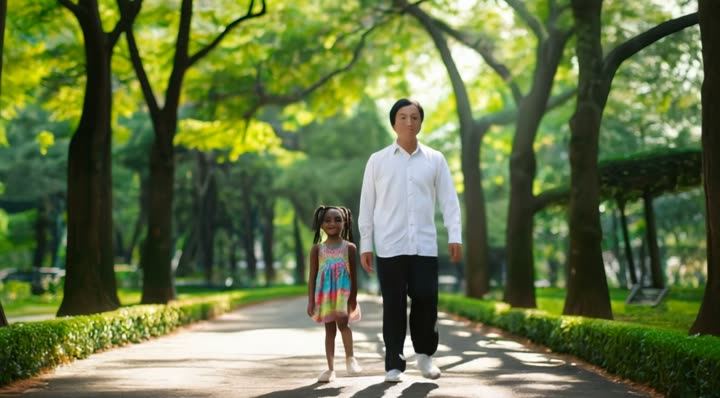
Video is likely
AI-made
When you scan a video, don't stop at the headline. A good result tells you which checks ran and what each one found: the video model, the frame model, the voice, any visible AI watermark or Content Credentials, and for links, the caption and published fact-checks. It also says when a check couldn't run. Our explainer on what a detector's score means walks through reading one.
Putting your answers together
You won't get seven clean answers for every video. Here is a sensible way to weigh them.
- Several answers point to AI, and the scan agrees: treat it as AI-generated. Don't share it as real.
- Your answers look fine, but the scan says "Most likely AI-generated": look at the reasons it gives. Detectors see things eyes can't, like how motion flows between frames.
- Your answers raise doubts, but the scan says "Most likely real": the video may be genuine footage with a false caption. Check when and where it was really filmed with our guide to finding out if a viral video is old.
- The scan says "not conclusive" or "Too close to call": treat it as unverified, and say so if you share it at all.
Ask the seventh question now
Have a video in front of you? Paste the link or upload the file on the is this video real page. A Quick Scan is free to try, needs no sign-up, and answers in under a minute for most videos.
Quick answers
Which question is most useful?
Question 1, about who filmed it, is the easiest to overlook. It works even when the picture is flawless, because it's about the situation, not the pixels.
Can a video pass the first six and still be AI?
Yes. The best generators can produce clips with no visible mistakes and believable sound. That's why the seventh question is a scan, and why even a scan's answer is "most likely", never "definitely".