Guides
Real or AI video? A 60-second check anyone can do
A one-minute routine for any video on your phone: 20 seconds on the source, 20 on the picture and sound, 20 on a scan. What each step catches and misses.
Video Verifier team · · 5 min read
You can't always tell a real video from an AI one by eye any more, but you can get a good answer in about a minute. Spend 20 seconds on who posted it, 20 seconds looking and listening for a few specific things, and 20 seconds running a scan. If the answer still isn't clear, don't share it as real.
This is the short version. It won't catch everything, and the last section explains what it misses. But it's fast enough that you'll actually do it, which matters more than a perfect method you skip.
Seconds 0 to 20: who posted it?
Before you look at the pixels, look at the post around them. Many fakes give themselves away here, and it's the step people skip.
- Tap the name. Is it the person, news outlet or organisation it seems to be, or an account with a similar name? A big claim from an account you've never heard of needs more checking than one from a source with a long track record.
- Glance at the feed. An account that posts nothing but "incredible moments", unbelievable rescues or perfect animal clips, several a day, may well be an AI content farm.
- Read the caption and tags. Some creators say it themselves: #aivideo, #sora, #veo3, "made with AI". Some platforms add their own label too.
- Is this the original? Another account's logo in the corner, "via" or "credit" in the caption, or a cropped frame usually means a repost. The original is a better copy to check and often has more context.
Seconds 20 to 40: look and listen for four things
You don't have time for a full inspection, so pick the four checks that pay off most often.
- Follow one object. Choose a car, a cup, a necklace or a sign and watch it for the whole clip. In AI video, things can change colour, shape or number when they pass behind something.
- Watch where things touch. Hands gripping, feet on the ground, a ball hitting a bat. Contact and cause and effect are still where generators slip.
- Read any text. Shop signs, number plates, banners. Letters that almost spell a word, or that change between frames, are a strong hint.
- Listen to the room. A voice that is studio-clean in a noisy street, or background sound that cuts in and out, deserves suspicion.
If you want the full list, our guide to the 12 signs of AI video goes deeper. For a 60-second check, these four are enough.
Seconds 40 to 60: scan it
Copy the link from the app's share menu and paste it on the home page. A Quick Scan is free to try, needs no sign-up, and gives an answer in under a minute for most videos. If the video came as a file, upload it instead.
You'll get a headline that leads with the side the evidence favours, such as "92% AI" or "88% Real", plus a plain answer like "Most likely AI-generated". Below it are the reasons: what each check found, and the moments in the video behind the result.
Here's how that looks on two clips from our test set. In the first card, a clip made with OpenAI Sora of a woman crouching to look into an oven; our video model scored it 99% AI. In the second, a real video of a cat looking out of a window, from Wikimedia Commons; our video model scored it 99% real.
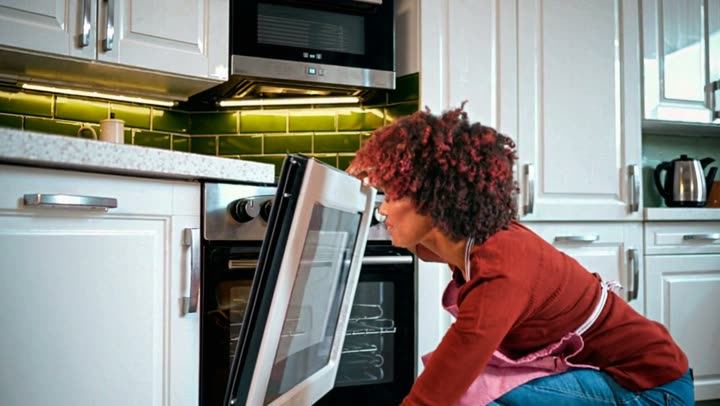
Video is likely
AI-made
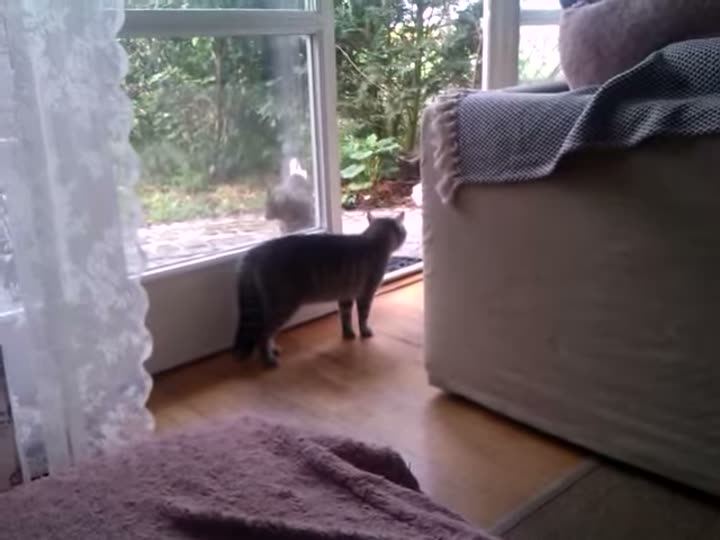
Video is likely
Real
A single frame rarely settles it. Our video model follows how the picture changes from frame to frame, which is where AI video tends to behave differently from footage recorded by a camera. Each scan also reads any visible AI watermark, checks for Content Credentials, listens to the voice, and for links looks at the caption and published fact-checks.
What 60 seconds can't do
Be honest with yourself about the limits of a quick check.
- It can't rule out every fake. No detector is 100% sure, ours included. Sometimes the answer is "Leaning AI, not conclusive" or "Too close to call". That is a real answer: it means the evidence doesn't point clearly either way.
- Real footage can still mislead. Many fakes on WhatsApp aren't AI at all. They're real videos from another year or country with a new caption, and a scan will rightly call them real. Our guide to edited and out-of-context videos covers that trap.
- Copies lose evidence. A clip forwarded many times, or a screen recording of a screen, has less detail for any check to work with. Find the original post when you can.
When it matters, take five minutes instead
If you're about to forward something to a big family group, report on it, or send money because of it, the one-minute check is the start, not the end.
- Use reverse video search to find where the clip first appeared and when.
- Search the claim with the words "fact check".
- Run a Deep Scan, which checks every second of picture and the whole soundtrack instead of a sample. Here's when to choose Quick or Deep.
Make it a habit
The routine works because it's short. Source, four looks, one scan. After a week of doing it, you may find the first 20 seconds catch more than you expected, and that the scan is mostly there for the clips that genuinely fool you.
Got a clip you're not sure about right now? Paste it into the AI or real checker and read the reasons, not just the number.
Quick answers
Can you tell if a video is AI just by looking?
Sometimes. Older or cheaper AI clips still show obvious mistakes. The best recent ones often don't, especially after compression. Looking is worth doing, but treat it as one piece of evidence.
Is the check free?
A Quick Scan is free to try and needs no sign-up. A Deep Scan, with every second checked and a full report, is a small one-time payment or part of a monthly plan.
What if the result says "not conclusive"?
Treat the video as unverified. Check the source, look for the original, and don't share it as real or fake until you know more.