Guides
Fake CCTV and dashcam videos: how to check
AI fakers love the 'caught on camera' look: grainy, fixed, timestamped. How to check a CCTV or dashcam clip by its timestamp, camera angle and source.
Video Verifier team · · 5 min read
To check a CCTV or dashcam video, test it against how real security and car cameras behave: a fixed or vehicle-mounted view, a timestamp that ticks one second per second, believable lighting, and a source that can say where the camera is. Then look for AI tells and scan it. The grainy "caught on camera" look is popular with AI creators precisely because it hides flaws and feels like evidence.
Why fakers love the CCTV look
A "CCTV" label does a lot of work for a fake:
- Low quality hides mistakes. Blur, noise and compression cover the small glitches that give AI away in sharp footage.
- A fixed camera is easy. Generators struggle with complex camera movement; a static, high, wide view is simple to fake.
- The overlay looks official. A date, a time and a camera name make a clip feel like evidence from a recorder, not a creation.
- The genre spreads. Near misses, animal attacks and "unexplained" moments are some of the most shared videos online.
A widely reported example: in November 2025, a "CCTV" clip that appeared to show a tiger dragging a man away at a forest guest house in Chandrapur, Maharashtra, carried a timestamp of 31 October 2025, 6:42 pm. It was AI-generated. Alt News noticed the man and tiger blending into the background, dust rising while nearby leaves stayed still, and a shadow falling the wrong way; the district information office and PIB Maharashtra both said it was fake (Alt News).
Check 1: The timestamp and overlay
- Does the clock tick properly? Watch the seconds. A real recorder counts one second per second of video. A frozen, jumping or too-fast clock is a red flag, unless the clip has been sped up, which should be obvious.
- Is the text clean? Camera names, channel numbers and dates in AI clips are often slightly garbled, or change mid-clip.
- Does the date add up? Check that the day of the week matches the date, and that the time matches the light. "6:42 pm" in bright midday sun is wrong.
Keep this in proportion: real cameras often show the wrong date because nobody set them. A wrong timestamp alone doesn't make a clip fake; a broken one is more telling.
Check 2: The camera's point of view
CCTV is usually mounted high in a corner, looking down with a wide lens that bends straight lines near the edges. It doesn't follow the action smoothly unless it's a motorised camera, and it doesn't zoom in cinematically at the perfect moment.
Dashcams are fixed to a vehicle. The bonnet or dashboard is often in view, the whole picture moves with every bump and turn, and any speed or GPS overlay should change as the car speeds up, slows down or stops.
Ask yourself: where exactly is this camera, and would anyone mount one there? A camera hovering in mid-air above a road, or one that drifts gently sideways like a drone, isn't a security camera.
Check 3: Light, sound and physics
- Night footage. Many security cameras switch to black-and-white infrared at night. A "night CCTV" clip in rich, cinematic colour deserves a second look, though some modern cameras do record colour at night.
- Sound. Most CCTV records no audio, while dashcams often record cabin sound. A "CCTV" clip with crisp dialogue and dramatic sound effects is suspicious.
- Physics. Watch dust, water, debris and shadows, as in the tiger clip. Watch whether people and animals keep a consistent size and shape as they move across the frame.
- Text in the scene. Shop boards and number plates in the background are often garbled in AI clips.

Video is likely
AI-made
Video is likely
Real
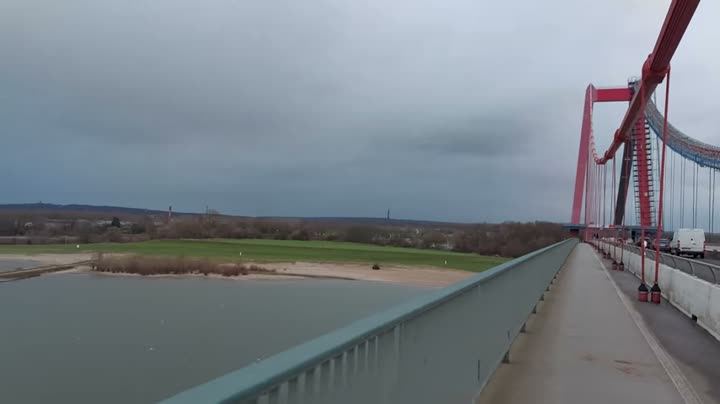
Two results from our test set. First: a rainy city street at dusk, made with Hailuo 02, the kind of moody, low-light scene that "caught on camera" fakes use. Our video model scored it 99% AI, though Hailuo 02 is one of the harder tools for us: on held-out clips it flagged 84.8%. Second: real footage of a walkway on a suspension bridge from Wikimedia Commons, read as 99% real.
Check 4: Where did it come from?
Real CCTV clips usually come with a trail: a shop owner, a housing society, the police, a news report naming the place. Ask:
- Who posted it first, and do they say where the camera is?
- Did local news or police mention the incident?
- Does the place exist? Search the shop name or road on a map.
- Is the account full of similar dramatic "caught on camera" clips? Many AI creators post dozens.
If the clip claims to be old, our guide to finding when a video was really filmed helps.
Check 5: Scan it, knowing the limits
Paste the link or upload the file to check whether the video is real. Our scan follows how the picture moves over time, checks individual frames and reads any visible AI watermarks.
Be realistic about CCTV, though. Real security footage often reaches social media as a phone recording of a monitor, then gets compressed by every app it passes through. That strips out the fine detail any detector relies on, so a "not conclusive" answer becomes more likely. If you can, find the original upload rather than a re-recorded copy. Our explainer on why compression makes fakes harder to catch explains why.
Quick answers
The clip has a timestamp. Doesn't that prove it's real?
No. Adding a date and time overlay takes seconds, and AI tools can generate one directly. Check that it behaves like a real clock.
Can a dashcam video be AI-generated?
Yes. Road "near misses" and crashes are a popular AI genre. Check that the view moves with the car and that any speed shown matches the motion.
Is screen-recorded CCTV less trustworthy?
Not necessarily, as many real clips spread that way. But it's harder to check, so lean more on the source.
Check a "caught on camera" clip
Paste the link on the home page for a free Quick Scan, no sign-up needed. For footage that really matters, a Deep Scan checks every second of picture.