Guides
How to check if a video is AI-generated, online and free
Five free online checks in the order that works, what each one can catch, what it can't, and how to read the results together without paying or signing up.
Video Verifier team · · 5 min read
You can check whether a video is AI-generated online for free in five steps: search for an existing fact-check, reverse-search a few frames, look for Content Credentials, scan the video with an AI video detector, and read the evidence together. Each free check catches something the others miss, and none of them alone can prove a video real.
This guide is about knowing what each free tool can and can't tell you, so you don't put too much weight on any single one.
Step 1: Search for an existing fact-check
What it catches: videos that are already viral and have been checked by professionals.
Search the claim in a few words, plus "fact check", in English and in your own language. Google's Fact Check Explorer collects fact-checks from many publishers in one place. In India, organisations like BOOM, Alt News, Factly and Vishvas News regularly check viral videos.
What it misses: anything new. A video posted this morning won't have a fact-check yet, and a quiet AI clip that never went viral never will.
Step 2: Reverse-search a few frames
What it catches: old real footage with a new caption, and AI clips that have been posted before with an honest description.
Pause on two or three clear frames, take screenshots, and search them with Google Lens or another image search. Look at the dates of the results. On a computer, the free InVID-WeVerify browser extension, made for journalists, can split a video into keyframes and send them to several search engines at once. Our reverse video search guide walks through it.
What it misses: brand-new AI clips. A video generated last night has no earlier copy to find, so reverse search comes back empty. Empty results don't mean real.
Step 3: Look for Content Credentials
What it catches: files that still carry signed information about how they were made. Some AI tools add Content Credentials (also called C2PA) saying a video was AI-generated, and some cameras add them to say footage was recorded.
You can upload a file to the free Verify tool at contentcredentials.org to see whether it has any.
What it misses: most videos you'll get on WhatsApp or download from social media. Re-uploads, screen recordings and many apps strip this information. A file with no credentials tells you nothing. Our explainer on Content Credentials covers why.
Step 4: Scan it with an AI video detector
What it catches: clips that pass the first three steps because they're new, unlabelled and look fine. This is where most of the work happens.
Paste the link or upload the file on our AI video checker. A Quick Scan is free to try, needs no sign-up and answers in under a minute for most videos. Every scan runs several checks:
- our own video model, which follows how the picture moves over time
- a frame model that looks for AI traces inside individual frames
- a voice model that listens for synthetic speech
- reading any visible AI watermark, like "Sora" or "Veo"
- Content Credentials and file metadata
- a list of known fakes, to catch re-uploads of videos already confirmed as fake
- for links, the post's caption and tags, and published fact-checks
Here's an example of the kind of clip this step exists for. Below is a frame from a clip of a man running with a dog in a park, made with Tencent HunyuanVideo. Nothing about it is newsworthy, so there's no fact-check to find and no earlier copy to reverse-search. Our video model scored it 99% AI.
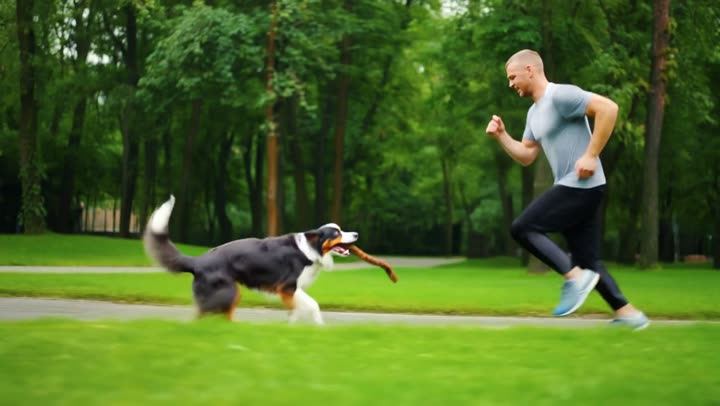
Video is likely
AI-made
What it misses: no detector is 100% accurate. On our independent test with AI tools our model never trained on, it flagged 97% of 601 AI videos, and read 96% of 84 real videos as real. It's weaker on polished stock footage, on some of the newest generators, and on heavily edited clips. We publish all of that on our accuracy page.
Step 5: Read the results together
The free checks are most useful in combination. A few common patterns:
- Fact-check found, says it's AI: you have your answer, and the fact-check explains why.
- Reverse search finds the same footage years ago: it's real but old. A scan will rightly say "Most likely real"; the caption is still false.
- Nothing found anywhere, scan says "Most likely AI-generated": a new AI clip. Read the reasons in the report: which checks pointed to AI, and at which moments.
- Nothing found, scan says "not conclusive": treat it as unverified. That's an honest result, not a failure.
What free checks can't do
- Prove a video is real. They can show that no sign of AI was found, which is useful, but they can't rule out a skilled fake.
- Tell you if real footage is misleading. A real clip from another event, edited or slowed down, isn't AI. That needs the source checks in steps 1 and 2.
- Recover lost detail. A tenth-generation WhatsApp forward has less evidence in it. Find the best copy you can.
If the video matters a lot, a Deep Scan checks every second of picture and the whole soundtrack, with a full report and PDF. It's a small one-time payment or part of a monthly plan. For everyday videos, the free Quick Scan plus the steps above is often enough to decide whether to share.
Choosing between free detectors? Our guide on 7 questions to ask a free AI video detector helps you judge any of them.
A note on privacy
Uploaded files on our site are deleted automatically within 24 hours. The report stays, so you can share its link. If a video is private or sensitive, think before uploading it anywhere.
Quick answers
Is there a completely free way to check a video for AI?
Yes. Fact-check searches, reverse image search, the Content Credentials Verify tool and a Quick Scan on our site are all free to try. A Deep Scan is a small one-time payment or part of a monthly plan.
Do I need to sign up?
Not for a Quick Scan. Paste a link or upload a file and you get an answer, usually in under a minute.