How it works
Can AI video detectors be fooled?
Cropping, filters, screen recording and compression all strip evidence from a video. What each one removes, what survives, and how to read a result on an edited clip.
Video Verifier team · · 5 min read
Yes, sometimes. Any AI video detector can be pushed towards a wrong answer, and every detector also gets some clips wrong with no tricks at all. What matters is what each kind of edit does to the evidence, and whether the detector admits it when the evidence runs out. This post explains that from the side of the person checking a video. It isn't a guide to hiding fakes, and you won't find one here.
The short version
Most edits don't turn a fake into a real video. They throw evidence away. A careful detector should respond by becoming less sure, not by switching to "real". That difference is the first thing to look for in any tool, ours included.
Cropping
What it removes: the visible watermarks many AI tools stamp on their videos, the edges of the frame, and part of the scene.
What survives: everything left in the picture, and how it moves: faces, hands, water, cloth, crowds.
What it means for you: a clip that looks oddly zoomed in, or has a blurred or covered patch where a logo might have been, has had something taken out. That's a reason to look harder, not a sign it's genuine. A missing watermark proves nothing either way; our guide to AI video watermarks explains why.
Filters, colour changes and overlays
What they remove: some of the fine pixel texture that frame-by-frame checks rely on. Captions, stickers, borders and "reaction" frames also cover parts of the picture.
What survives: how objects move and whether they stay the same from second to second.
What it means for you: heavy filters and busy overlays tell you you're watching a re-edit, not the first upload. Try to find a cleaner copy before you decide anything.
Screen recording and re-filming
When someone records a video playing on their screen, or films another screen with a phone, the result is a brand-new file.
What it removes: all of the original file's metadata, including any Content Credentials (C2PA) that might have said the video was made with AI. It also adds another round of compression and often rescales the picture.
What survives: the motion in the picture, softened, and some version of the soundtrack.
What it means for you: phone interface elements, screen glare or wavy moiré lines in the picture mean the clip's history has been cut off. Search for the original post; our reverse video search guide shows how.
Compression and re-uploading
Every re-share compresses a video again and throws away detail. This is the most common "edit" of all, and usually nobody does it on purpose: messaging apps and social platforms do it automatically. The faint traces that frame-based checks look for are among the first things to go. Our post on why compression makes fakes harder to catch explains what gets lost.
That's why we test our own model on degraded copies. Every clip in our held-out test is checked as published, as a WhatsApp-quality copy, at 360p and heavily compressed, and its 95.3% balanced accuracy across those 11,952 test videos includes all four versions. A clearer copy still allows a more confident answer.
Mixing real and AI
A real video with an AI-generated voice, or one generated shot cut into real footage, is neither fully AI nor fully real. A detector that only answers yes or no will struggle with it. Ours can answer "Most likely real footage with AI added", and a Deep Scan breaks the result down into real, real + AI and fully AI. Very short AI inserts are still hard to catch for any tool.
The biggest gap isn't an edit
The most effective way past a detector isn't a filter: it's a new generator the detector hasn't learned yet. Our measured numbers show this plainly. PixVerse clips were flagged 98.1% of the time and Kling 96.8%, while Luma Ray 2 was flagged 80.0% of the time and wrongly called real in 6.2% of cases. Hailuo 02 sits at 84.8% and 5.4%.
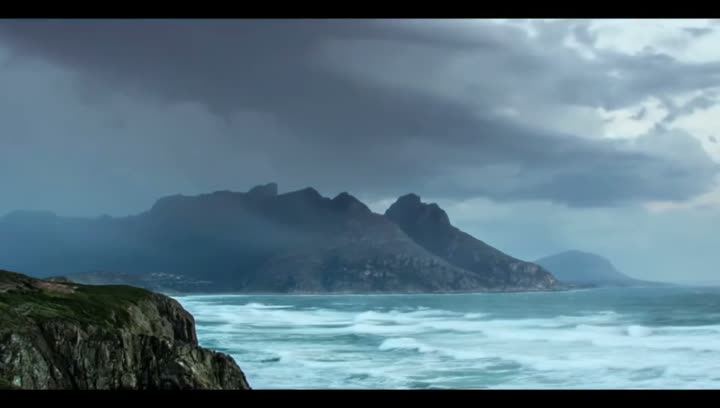
Below: two unedited clips from our test set. In the first card, a surfer made with Runway Gen-3, which our video model scored 99% AI. In the second, a stormy coast made with Luma Ray 2, which the same model read as 99% real. Nobody cropped, filtered or re-recorded the second clip. It's simply a miss, and a reminder that a "real" reading is evidence, not proof.

Video is likely
AI-made
Video is likely
Real
Why one check is never enough
Each check is blind in a different place. A visible watermark can be cropped. Content Credentials vanish in a screen recording. Pixel traces fade with compression. Motion can come from a generator the model hasn't met. Invisible watermarks such as Google's SynthID are designed to survive common edits like cropping, filters and compression, but they only exist in videos from tools that add them.
So every scan runs several checks: our own motion-based video model, an AI-pixel frame model, a voice model, watermark reading, Content Credentials, metadata and, for links, the post's caption and published fact-checks. A language model weighs the findings, and fixed rules stop it answering "Most likely real" without solid evidence. When a check can't run on a clip, the report shows it as unavailable instead of scoring it.
Signs a clip has been "cleaned up"
You don't need to know how an edit was made to notice one:
- The frame looks cropped or zoomed, especially if a corner is blurred or covered.
- There's a border, a caption bar or another video around it.
- You can see phone buttons, screen glare or rippling moiré lines.
- It's far blurrier than the account's other videos.
- It's very short, or cut just before something would happen.
None of these proves a fake. Real clips get re-edited all the time. But each one means the copy in front of you is further from the original, and the original is where the evidence is.
What a careful result looks like on an edited clip
If a heavily edited clip comes back "Leaning AI, not conclusive" or "Too close to call", the detector is doing its job: it's telling you the evidence ran out. That's more useful than a confident guess. Find a better copy, check the source, and scan again.
Check the best copy you can find
Paste the original post's link on the home page rather than a forward or a screen recording. It fetches videos from Instagram, YouTube, X, Facebook, TikTok and 1,000+ other sites. For the tool that gave us the miss above, see our Luma page.
Quick answers
Can a filter make an AI video pass as real?
It can remove some traces and lower a detector's confidence. A careful detector should then say "not conclusive" rather than "real", but no detector is immune to mistakes.
Does removing the watermark hide that a video is AI?
It removes one clue. The motion, the physics and the other checks are still there, which is why a missing watermark proves nothing.