How it works
AI video watermarks to look for, tool by tool
The visible marks Sora, Veo, Kling, Hailuo, PixVerse and Chinese apps put on AI video, the invisible ones, and why a missing watermark proves nothing.
Video Verifier team · · 5 min read
Many AI video tools stamp a small mark on what they make: a logo, a name or a label such as "AI生成" (Chinese for "AI-generated"). Spotting one can settle a question in seconds. But marks are easy to crop, paid plans often export without them, open models add none, and anyone can paste a fake one onto a real video. Treat a watermark as strong evidence when it's there, and as no evidence at all when it isn't.
Where to look
Watermarks are small and pale on purpose, so they're easy to miss on a phone.
- Corners first, especially the bottom right, then the other three.
- Pause in several places. Some marks move during the clip, and captions or stickers can hide them in some frames but not others.
- Zoom in on a screenshot. A faint logo is easier to read when it's large.
- Check the edges for signs a mark was cut off: a tight crop, a blurry patch, a sticker or caption covering a corner.
Visible marks, tool by tool
Tools change their watermark rules often, by plan and by app, so treat this as a guide to what to look for at the time of writing, not a fixed list.
- OpenAI Sora. Sora 2 clips carried a small cartoon cloud logo with the word "Sora", which could move around the frame. Reports said the Sora app closed in April 2026, but its clips are still re-shared, often with the mark removed. See our post on spotting Sora clips without the watermark.
- Google Veo. Google said in 2025 that Veo videos made in the Gemini app carry a small "Veo" mark, usually bottom right. Some Google tools and plans export without it. More on our Veo detector page.
- Kling. Look for "Kling AI" or "可灵" (Kling's Chinese name) in a corner on clips from free plans.
- Hailuo (MiniMax). Look for "Hailuo AI" or "海螺AI" on clips made with free credits.
- PixVerse, Runway, Pika and Luma. Small logos are common on free-plan clips; paid plans may remove them.
- Chinese apps. Clips saved from apps in China may carry "AI生成", or a tool's name such as Jimeng (即梦), Doubao or Tongyi Wanxiang (通义万相). China's rules on labelling AI-generated content, in force since 1 September 2025, require services there to add visible labels to AI content, including when it's downloaded (a summary by law firm Loeb & Loeb).
- Open models such as Wan. Alibaba's Wan can be downloaded and run on anyone's computer. Run that way, it adds no watermark at all.

Video is likely
AI-made
Video is likely
AI-made
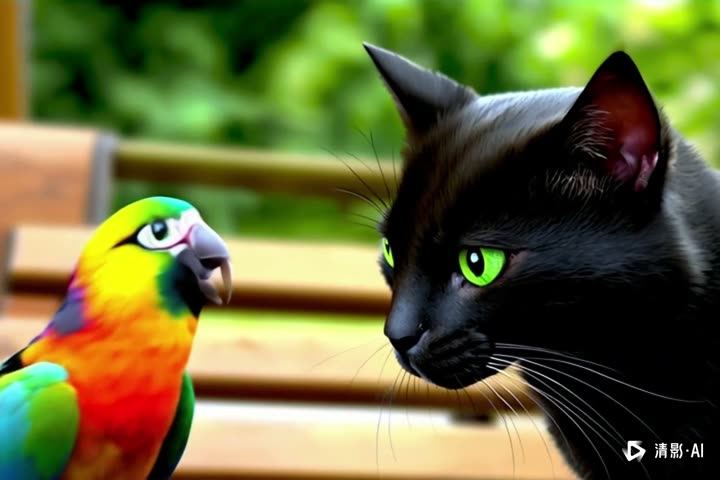
Above: an Alibaba Wan clip of a tropical beach at sunset, and a Zhipu Qingying clip of a parrot and a black cat. Both are from our test set, and both carry a small AI watermark in a corner, easy to miss at a glance. Our video model scored each 99% AI on its own: it doesn't read marks, it follows how the picture changes over time. Our separate watermark check is what reads the mark.
Video is likely
AI-made
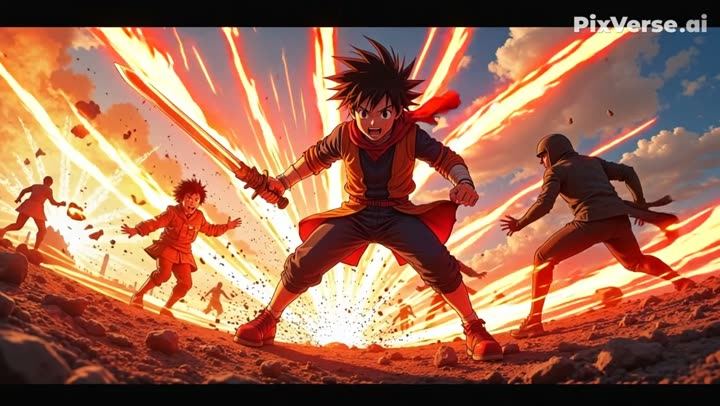
Here the mark is plain: a PixVerse watermark on an anime-style fight scene, which our video model also scored 99% AI. Stylised clips like this rarely fool anyone; the marks matter most on realistic footage, which is where a cropped mark does the most harm.
Invisible marks you can't see
Some marks are hidden in the file or the pixels.
SynthID (Google). Google says it embeds an invisible SynthID watermark in content made with its AI models, including Veo. At the time of writing, you can upload a video to the Gemini app and ask whether it was made with Google AI (Google's help page explains the limits). It only finds Google's own mark, and a "not detected" result doesn't mean a video is real. Our scan can't read SynthID.
Content Credentials (C2PA). A signed label inside the file saying which tool made or edited it. OpenAI said it attached them to Sora videos, and other tools and some cameras use them too. They're strong evidence when intact, but most social apps strip them on upload, and screen recordings drop them. Our explainer on Content Credentials covers how they work.
Platform labels. Instagram and Facebook show an "AI info" label, and YouTube shows an "altered or synthetic content" label, when the uploader declares AI use or the platform picks up certain signals. Their placement and rules change, and they depend on creators being honest or on hidden labels surviving.
Why a missing watermark proves nothing
- Cropping and blurring take seconds, and websites offering to remove AI watermarks are easy to find.
- Paid plans on several tools export without a visible mark.
- Open models like Wan add none when people run them themselves.
- Re-uploads strip metadata, so Content Credentials rarely survive a WhatsApp forward.
- Screen recording removes every hidden label.
And the reverse is also true: a watermark is just pixels. Someone can paste a "Sora" or "Veo" logo onto real footage as a joke or to discredit it. If a mark looks oddly sharp, sits in a strange place or doesn't match the tool's usual style, check the rest of the clip.
What our scan does with marks
Every scan reads visible AI watermarks and labels when they're on screen (for example "Sora", "Veo" or "AI生成"), and reads any Content Credentials left in the file. Each one is reported as evidence, with what it says. Our own video model, the frame check and the voice model then work whether or not a mark is present, and Jev, a large language model, weighs everything together. India's own labelling rules are covered in our post on the 2026 IT rules on AI labels.
See what a clip is carrying
Upload the file or paste the link on the home page. A Quick Scan is free, needs no sign-up and answers in under a minute for most videos. You'll see any watermark or label it found, alongside the other evidence, and an answer of "most likely AI-generated", "most likely real" or "not conclusive".