Scams and safety
AI news anchors and fake “breaking news” clips
Some channels use openly AI presenters; scammers use fake ones with lookalike logos. How to check whether a news clip, its anchor and its channel are real.
Video Verifier team · · 4 min read
A news clip can be fake in three places: the anchor, the channel or the footage. To check one, read the channel name and logo letter by letter, find the story on that outlet's official website or channel, and see whether any other news outlet reported it. A "breaking" story that exists only as a forwarded clip is almost never breaking news.
Not every AI anchor is a fake
Some real news organisations use AI presenters openly. In 2023 the India Today group introduced an AI anchor called Sana, and Odisha TV launched an AI presenter called Lisa who reads news in Odia and English. These are disclosed: the channels say they're AI, and they appear on the channels' own platforms.
That's the difference that matters. An AI presenter on a real channel's official account, clearly labelled, is a production choice. An AI presenter, or a real anchor's deepfake, on an account pretending to be a channel is a fake.
The three kinds of fake news clip
1. A real anchor, deepfaked
Footage of a well-known anchor is given a cloned voice and new words, often to "report" on an investment scheme or a miracle cure. These usually run as ads. We cover them in deepfake investment ads and celebrity scams.
2. A made-up anchor on a made-up channel
The presenter is generated, and so is the channel. In April 2026, BOOM found that a viral clip of an "Indian news anchor" losing his temper on air was AI-generated: the logo on screen read "BIBW News", which looked a little like a real Hindi channel's logo, but no such channel exists. BOOM also spotted a notepad merging into the desk and Hindi text that was misspelled on screen (BOOM's fact-check).
This isn't new. In February 2023 the research firm Graphika reported that a pro-China influence campaign had used AI-generated presenters for a fictitious outlet called "Wolf News", made with a commercial AI avatar service.
3. Real-looking footage in a news wrapper
A generated disaster, accident or protest is dressed up with a red "BREAKING" banner, a ticker and a channel-style logo. Free video apps include news templates, so the wrapper costs nothing and proves nothing.
Video is likely
AI-made
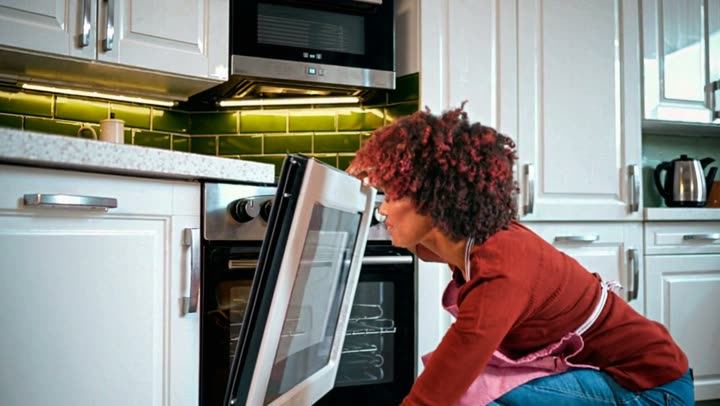
Above: a woman crouching to look into an oven, from a clip made with OpenAI's Sora. Our video model scored it 99% AI. It has nothing to do with news, and that's the point: the same tools that make an ordinary kitchen from a sentence can make a studio, a presenter or a "reporter on the spot".
How to check a news clip in six steps
- Read the logo and name slowly. Lookalike channels change one letter, swap a colour or add a word. Compare it with the real channel's logo on its verified account.
- Find the story at the source. Go to the channel's own website, YouTube channel or verified social accounts and search for the story or the anchor's segment. If a real channel aired it, it's usually there.
- Check whether anyone else reported it. Real breaking news is covered by many outlets within hours. A shocking story that only one unknown account carries is a red flag.
- Read every word on screen. Tickers, headlines and lower thirds in AI clips often contain misspellings, nonsense words or a script that's almost but not quite right.
- Watch the studio and the hands. Papers that melt into the desk, fingers that pass through objects, background screens showing gibberish and an anchor who never blinks or breathes are common tells.
- Listen to the voice. A cloned voice may sound flat, too clean for the room or slightly out of time with the lips. Our AI voice detector page explains what a voice check can and can't tell you.
Who posted it?
Look at the account that shared the clip, not just the clip. Fake news pages often:
- Use a channel's name with an extra word, such as "Live", "Official" or "Today".
- Were created recently, or were renamed from something unrelated.
- Post only shocking clips with no regular programming.
- Have comments turned off, or comments full of identical praise.
On YouTube, open the channel page and check its history and other uploads; our YouTube checking guide shows how to paste a video's link for a scan.
What a scan tells you about a news clip
A scan checks whether the picture and voice are AI-made. It looks at how the picture moves over time, the frames, the voice, any visible AI watermarks and Content Credentials, and for links, the post's caption and any published fact-checks. It answers "most likely AI-generated", "most likely real" or "not conclusive", with the reasons.
It can't tell you whether a real channel's reporting is accurate. A genuine anchor reading a misleading script will come back "most likely real", because the video is real. Checking the story is a separate job, and our video fact-check page covers both halves.
Quick answers
Is it legal for a channel to use an AI anchor?
Using an AI presenter isn't illegal in itself. India's 2026 IT Rules focus on labelling AI-generated content, which is why disclosure matters.
The clip has a real channel's logo. Doesn't that prove it's real?
No. Logos are easy to copy or overlay. Find the same clip on the channel's own verified account.
Why do fake news clips spread so fast?
They borrow the trust people place in news brands and add urgency. "Breaking" makes people share before they think.
Check that clip
Paste the link of any news clip that feels off on the home page. A Quick Scan is free to try, needs no sign-up and usually answers in under a minute.