India
AI cricket videos: fake catches and fake player clips
Impossible catches, fake fights and players 'promoting' gaming apps. How AI cricket fakes are made, and how to check one against match records in a few minutes.
Video Verifier team · · 4 min read
Cricket has one big advantage over most viral videos: almost every ball of every professional match is recorded, broadcast and written up. So the fastest way to check an "unbelievable" cricket clip is to find the match. If a catch, a fight or a statement isn't in the ball-by-ball commentary, the highlights or any match report, it very likely didn't happen.
The kinds of fake cricket clips
Impossible catches and shots
AI tools can now edit real broadcast footage or generate new "highlights". In September 2026, CyberPeace found that a viral clip of a woman cricketer taking a spectacular 360-degree catch was made with AI on top of real broadcast footage from the 2024 Women's T20 World Cup match between India and New Zealand. The catch was never part of that match (CyberPeace fact-check).
That's the typical recipe: real stadium, real teams, real broadcast look, one invented moment.
Fake fights and controversies
Clips of players from rival teams clashing, sledging or refusing handshakes travel especially fast around high-pressure matches. Fact-checkers have debunked several AI-made "fights", usually by showing that the match, venue or players in the clip don't match the record.
Fake player statements and endorsements
A cloned voice over real interview footage can make any player "announce" a retirement, criticise a teammate or recommend an app. In January 2024, Sachin Tendulkar posted on X that videos showing him promoting a gaming app were fake. BOOM found the footage came from an older interview and the voice was a clone (BOOM's fact-check), and police in Mumbai registered a case.
Fully generated "match" footage
Short clips of packed stadiums, dramatic last-ball finishes or fans storming the pitch, generated from a text prompt. These often come from accounts that post nothing but "epic" sports moments.
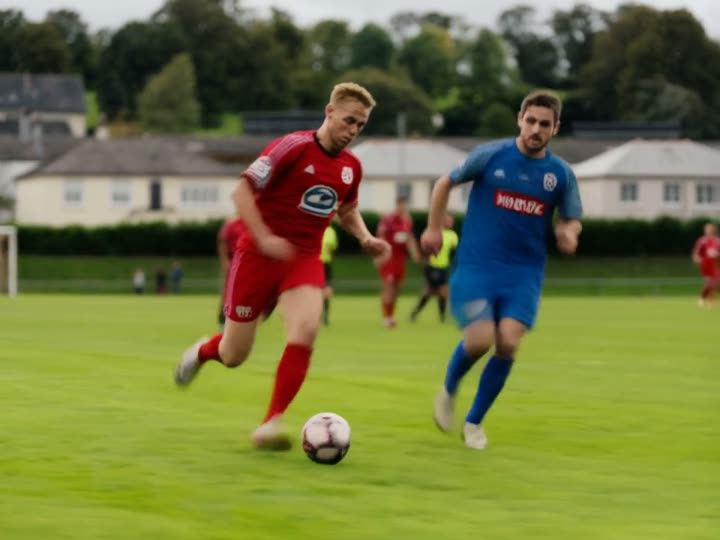
Video is likely
AI-made
Above: footballers chasing the ball on a grass pitch, from a clip made with MiniMax Hailuo. Our video model scored it 99% AI. It's football, not cricket, but it shows why sports fakes work: running players and a green field look convincing at a glance, even though nobody ever played this game.
How to check a cricket clip in five minutes
1. Identify the match
Work out who's playing, where and when. Look at the scoreboard graphic, the team kits, sponsor logos and the ground. If the post doesn't say, the comments often do.
2. Check the record
Open the scorecard and ball-by-ball commentary on a major cricket site, or the official BCCI or ICC pages. A spectacular catch, a run-out or an on-field fight would be described. Then search for the official highlights on the broadcaster's or the board's verified channels. If the moment isn't in either, be very sceptical.
3. Read the graphics
Broadcast graphics follow strict rules. Check that the score, overs and batter names in the score bug make sense, that the score changes logically, and that the channel logo looks right. AI edits often get numbers, names on shirts and sponsor text slightly wrong.
4. Watch the ball and the bodies
Follow the ball for the whole clip. Does it travel in a believable arc and speed? Does a diving fielder land the way a body would? Does the boundary rope move when someone crosses it? AI often gets momentum and contact wrong, especially around fast movement. Our list of what AI video generators still get wrong has more of these tells.
5. Check the player's own accounts
For statements, retirements and endorsements, look at the player's verified accounts and their board's announcements. No real player announces a retirement only through a forwarded clip. Be especially wary of any player "recommending" a betting or money-making gaming app.
Real clip, wrong story
Not every misleading cricket video is AI. Old footage resurfaces all the time with a new caption: an old celebration shared as last night's, a domestic match presented as an international one, or crowd trouble from one country shared as another. A scan will correctly call that footage real, so also check the date. Our guide to edited and out-of-context videos covers these tricks.
When the voice is the fake
For fake interviews and endorsements, the face is often genuine footage and only the voice is new. Listen for flat emotion, odd pauses, an accent or rhythm that doesn't match the player, and audio that's too clean for a stadium or a press room. A voice check is part of every scan; our AI voice detector page explains what it can and can't tell you.
Quick answers
The clip has a TV channel's logo. Is it real?
Not necessarily. Logos can be copied, and AI edits often start from real broadcast footage. Find the same moment in the official highlights.
How do fakers make "highlights" so fast?
Some take real footage and change one moment with AI; others generate the whole clip from a description. Both can be ready within minutes of a match ending, which is when people are most eager to share.
Can a scan tell if only the catch was edited?
It can, but a short edit inside long real footage is harder to catch than a fully generated video, and the answer may be "not conclusive". A Deep Scan, which checks every second of picture, gives it the best chance. Either way, that's when the match record matters most.
Check that clip before the group chat does
Paste the link from Instagram, X or YouTube on the home page. A Quick Scan is free to try, needs no sign-up and answers in under a minute for most videos.