Guides
AI baby and kids videos: how to tell they're fake
Talking babies, toddler “podcasts”, child prodigies and tearful appeals: why AI videos of children are everywhere, the tells, and when they turn harmful.
Video Verifier team · · 5 min read
AI videos of babies and children are made to be shared: a toddler giving a podcast, a six-year-old playing like a concert violinist, a baby who "talks back" to its mother. Many give themselves away when you check whether a child that age could do it, and look at the hands, the mouth and the proportions. The ones to worry about aren't the jokes; they're the clips that ask for money, sympathy or a share to "find the parents".
Why there are so many
Babies and children get attention, and attention is what clip pages sell. AI tools make it easy: some apps are marketed specifically for turning a photo into a "baby podcast" or a talking-baby clip, and general video generators can put a child into any scene from a one-line prompt.
You'll mostly meet three kinds:
- Obvious comedy. Babies in podcast studios, babies reading the news, babies as office workers. Nobody is meant to believe them.
- Quiet "talent" clips. A small child singing like a professional, solving a hard puzzle in seconds, or playing an instrument perfectly. These are often shared as real.
- Emotional appeals. A crying child "lost" at a station, a sick child whose family "needs help", a toddler "rescued" from danger. These are the ones that can do harm.
Harmless or misleading?
The question isn't whether AI was used. It's whether the clip pretends to be real in a way that matters.
A talking-baby joke shared as a joke is fine. The same clip forwarded as "this baby said its first full sentence at four months" is misinformation, if a mild one. A clip of an AI "lost child" with a phone number or payment QR code at the end is something else: it uses your kindness to get calls, clicks or money.
So when a child video moves you, ask what it wants you to do next. Laugh? Fine. Share to "help find" someone, or pay? Check first.
The tells, child by child
1. Could a child that age do it? Start with common sense. A baby who looks a few months old shouldn't hold a microphone and speak full sentences. A small child playing a fast, difficult piece without ever looking at their hands deserves a second look. Real gifted children exist, so this is a reason to check, not proof.
2. Proportions. AI often gets children's bodies slightly wrong: hands too long and adult-like, heads that change size, faces that look like a shrunken adult. Compare the hands to the face.
Video is likely
AI-made
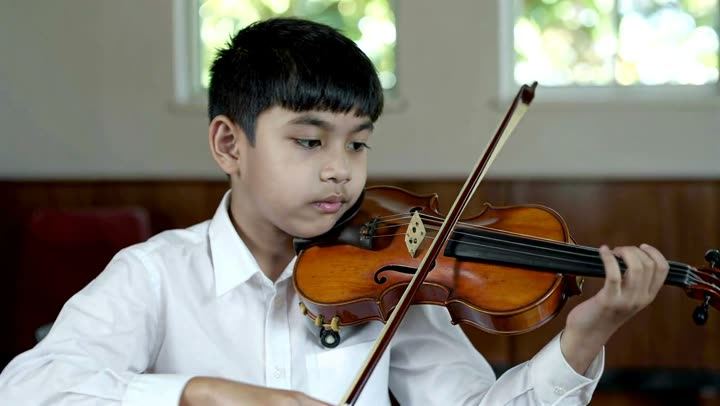
Above: a frame from a ByteDance Seaweed 2.0 clip in our test set, a boy playing the violin. Our video model scored it 99% AI. "Child prodigy" clips like this are easy to make and hard to question. With any instrument clip, watch whether the fingers actually match the notes you hear and whether the bow moves with the sound.
3. Mouths and voices. When a baby "talks", watch the lips on "p", "b" and "m", which need the lips to close. Listen for a voice that's too clear and adult in its timing, with words a baby couldn't know.
4. Skin, teeth and eyes. Faces can be too smooth, like a doll's. Baby teeth may appear and disappear, and eyes can stare without the normal small movements children make.
5. The adults and objects around them. Generators focus on the main subject. Watch the parent's hands, the toys, the text on a cereal box or a school banner. Things that change shape or spell nothing are tells.
6. Behaviour. Real toddlers get distracted, look away, fidget and don't perform on cue. A child who hits every beat perfectly, every time, may not be a child at all.
Our general guide to 12 signs of AI video covers more of these.
Real children's photos are being used
Some talking-baby and "what your child will look like" clips start from a real child's photo. If you try these apps, think about whose photo you're uploading and where it might end up. Don't upload other people's children, and be careful with your own: a clip that's sweet in a family group can be copied and reused by strangers.
If you find an AI video made from your child's photo, report it on the platform. If it's being used to threaten or cheat anyone, you can report it at cybercrime.gov.in or call 1930 in India. Our guide on what to do if someone made a deepfake of you has the steps, and they apply to children too.
Before you share a "lost child" or appeal clip
- Look for an official source. A real lost-child case is usually reported by police, a station or a local news outlet. Search the place and the claim.
- Check the date. Even a real appeal can keep circulating long after the child was found.
- Never pay through a link or QR code in the clip. Give through organisations you already know, on their own websites.
- Scan the video before you forward it to a group.
Check a clip in under a minute
Upload the saved video or paste the post's link into our AI or real checker. A Quick Scan is free, needs no sign-up and answers in under a minute for most videos. It runs our own video model, which follows how the picture moves over time, along with a frame check and a voice model, and shows the evidence behind the answer: "most likely AI-generated", "most likely real", or "not conclusive" when the signals disagree.
If there are children at home who watch these clips, our Real or AI quiz is a good way to practise spotting them together.
Quick answers
Are AI baby podcast videos harmful?
Most are harmless jokes. The problem starts when a clip is passed off as real, uses a real child's photo without permission, or is used to ask for money.
Why do AI kids' videos look so smooth?
Generators tend to make skin flawless and movements fluid. Real children's videos are messier: shaky phones, mess in the background, kids who won't sit still.
Can a scan tell if a real child's photo was animated?
A scan looks for signs that the video itself was generated or animated by AI. It can't tell you whose photo was used; for that, ask where the clip came from.