How it works
Which AI video tools are hardest to detect?
Our measured results, tool by tool: Luma Ray 2, Hailuo 02, Moonvalley Marey and Google Veo are hardest for our detector. Why, and how to handle their clips.
Video Verifier team · · 4 min read
In our own tests, the hardest AI video tools to detect are Luma Ray 2, MiniMax Hailuo 02, Moonvalley Marey and Google Veo. Our detector flagged between 80% and 89% of their clips, against 95% or more for most other tools. The hardest case of all isn't a tool: it's AI clips found "in the wild", edited and mixed with other footage. Here are the numbers, what we think makes these tools hard, and how to handle clips that look like theirs.
How we measured
Every number below comes from held-out test clips: videos our model never saw during training. Each clip was checked in four versions: the original, a WhatsApp-quality copy, 360p and heavily compressed, because that's how videos really reach people.
For each tool we report two numbers:
- Flagged: the share of its clips our video model called AI.
- Wrongly called confidently real: the share it got wrong with confidence.
The second number matters more than it looks. A clip our model doesn't flag isn't automatically called real: when the evidence is mixed, the full result says "not conclusive", which tells you to check further. A clip confidently called real is the mistake that can mislead someone.
The hardest tools
- Luma Ray 2: 80.0% flagged, 6.2% wrongly called confidently real. Our weakest result on a named tool.
- MiniMax Hailuo 02: 84.8% flagged, 5.4% wrongly called confidently real.
- Moonvalley Marey: 87.9% flagged, 6.8% wrongly called confidently real. Fewer misses than Ray 2, but when it misses, it's more often a confident miss.
- Google Veo (Veo, 2, 3 and 3.1): 88.9% flagged, 2.3% wrongly called confidently real.
The middle
- Genmo Mochi: 90.0% flagged, 0% wrongly called confidently real.
- Tencent HunyuanVideo: 91.7%, 1.3%.
- Pika: 91.9%, 0%.
- CogVideoX / Qingying: 92.6%, 1.7%.
The easiest for us
- PixVerse: 98.1% flagged, 0.2% wrongly called confidently real.
- OpenAI Sora: 97.5%, 0.8%.
- Luma Dream Machine: 97.2%, 0.7%.
- Kling: 96.8%, 0.5%.
- Alibaba Wan: 96.0%, 1.0%.
Runway, the first Hailuo model, ByteDance's models and Vidu all sit between 95% and 96%. Every tool's figures are on our accuracy page.
AI clips "in the wild": the hardest case
We also tested AI videos found on Wikimedia Commons, posted by real people and often edited, trimmed or mixed with other footage. There, our model flagged only 58.3% and wrongly called 10.0% confidently real. The sample is small, so treat these numbers with caution, but the direction is clear: editing, filters and mixing with real footage remove evidence. That's why a Deep Scan breaks a video down into real, real plus AI, and fully AI, rather than giving one answer for the whole thing.
What we think makes these tools hard
We can measure which tools are hard; why is partly a guess. Our best explanations:
- They're newer and aim for realism. Luma said Ray 2, released in January 2025, was built for more natural motion and was trained with far more computing power than its earlier model. Hailuo 02 and Veo 3 are also later generations of their makers' tools.
- Cinematic training data. Moonvalley says it trained Marey only on licensed footage, reportedly much of it from filmmakers and agencies. Its clips can look like real film, with a real camera's softness and grain.
- Natural-looking light. Clips from tools like Veo often handle reflections, dusk and night scenes well, and those are scenes where real and generated footage look alike once compressed.
- Compression. Every clip was also tested as a WhatsApp-quality copy and a heavily compressed one. Compression wipes out fine detail, and the subtler a tool's traces are, the more of them it hides.

Video is likely
AI-made
Video is likely
Real
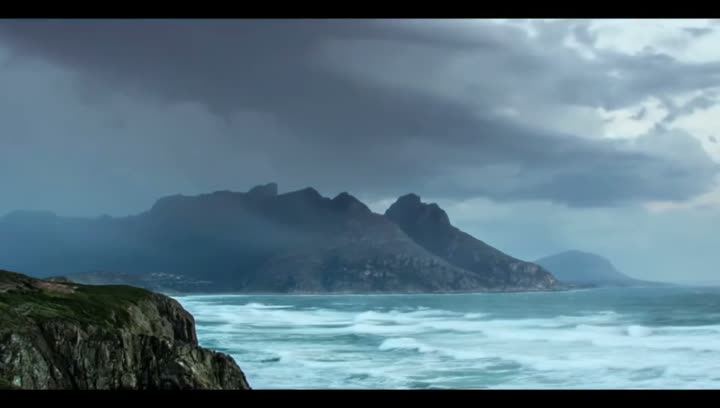
Two results from our test set. First card: a Hailuo 02 clip of a rainy city street at dusk, which our video model caught, scoring it 99% AI. Second card: an honest miss, a Luma Ray 2 clip of waves on a rocky coast under dark clouds, which our video model read as real. Both are moody, naturally lit scenes; one was caught and one wasn't.
What we do about it
- We don't let a single model decide. Every scan also runs a frame check, a voice model, visible watermark reading, Content Credentials, and for links the post's caption and published fact-checks. Jev, a large language model, weighs all of it.
- Code rules stop a "real" call without solid evidence. If our video model isn't confident a video is real and nothing else confirms it, the answer won't be "real"; it can be "not conclusive" instead.
- We publish our weak spots so you know when to double-check. Our post on whether AI video detectors can be wrong shows more of our misses.
How to handle clips like these
If a clip looks like the work of these tools (cinematic, moody light, a smooth gliding camera), don't stop at a single result.
- Read the reasons, not just the headline. A result with a modest score and mixed evidence is a prompt to check further.
- Find the source. Who posted it first? Is the account full of similar footage? Screenshots searched with Google Lens often lead to the first upload.
- Look for the event elsewhere. Real storms, fires and crowds are filmed by many people.
- Use the tool pages for what's specific to each: Luma, Hailuo and Veo.
Try a hard clip yourself
Paste a link or upload a video on the home page. A Quick Scan is free, needs no sign-up and answers in under a minute for most videos. For a cinematic clip that matters, a Deep Scan checks every second of picture and the whole soundtrack, with up to 12 times more frames.