India
Viral AI videos of Indian cities, trains and temples
Trains falling into rivers, futuristic stations, impossible festival crowds: how to check a viral AI video of an Indian city, train or temple before sharing.
Video Verifier team · · 4 min read
Many viral videos of Indian cities, trains and temples are now made with AI: trains plunging off bridges that never collapsed, gleaming "new" stations that don't exist, and festival crowds with celebrities who were never there. To check one, read the text on signs and coaches, look for the same event in local news and official handles, and check whether the place exists on a map. Real events in India get reported. Generated ones usually don't.
The kinds you'll see
Disasters that never happened
These do the most harm, because they frighten people. In August 2025, a clip of a train collapsing into the Ganga near Patna went viral. Factly found it was AI-generated, and PIB said the same on X; no such accident had happened (Factly's fact-check). Factly noted that the people and reporters standing nearby stayed untouched by the rushing water, the writing on the train was unreadable, and the coaches didn't look like Indian Railways coaches. Similar AI videos of trains falling from bridges and of bridges collapsing have been debunked too.
"Future India" and impossible infrastructure
Glossy clips of a futuristic Mumbai, a glass railway station or a gleaming new expressway. Many are made as art or as "imagine if" content, and that's fine when they're labelled. The trouble starts when a caption says "this is the new station in your city" or "look what's been built in only a year".
Festival crowds and temple "sightings"
Big religious gatherings attract AI content. During the 2025 Maha Kumbh in Prayagraj, fact-checkers debunked AI videos of famous tech and business leaders apparently running stalls at the mela and of a giant snake "spotted" near the crowds. BOOM noted that the stall video came from an Instagram account that says it makes AI content, and that the hands in it looked malformed and moved unnaturally.
Animals in the city
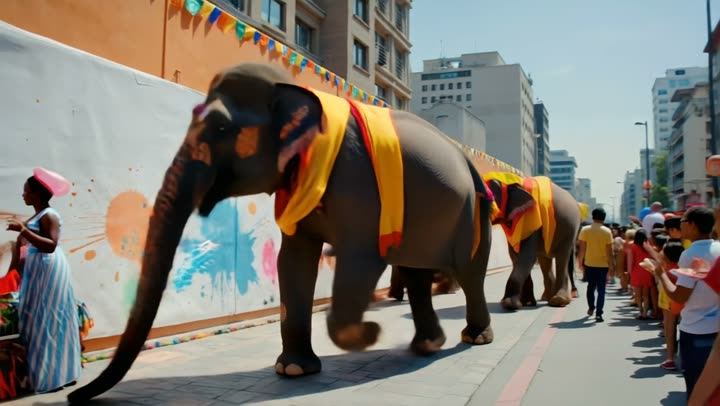
Elephants, leopards, tigers or huge snakes "spotted" on a busy street or in a train coach. Some are real and many aren't. Animal clips spread fast because they're thrilling, and in India they can be believable.
Video is likely
AI-made

Video is likely
Real
Two results from our test set. First: decorated elephants walking down a city street, made with Pika, which our video model scored 99% AI. Second: a real video of a busy shopping street from Wikimedia Commons, which it read as 99% real. Neither is a problem on its own. The problem starts when someone adds a caption like "live from the procession today" to the first one.
How to check a city, train or temple video
1. Read every sign, coach and banner
Indian streets are full of text: shop boards, station names, coach numbers, bus routes, banners in several scripts. AI struggles with all of it. Look for words that almost make sense, Devanagari or other scripts with wrong shapes, and station names that don't exist. Real Indian Railways coaches have consistent colours, numbering and markings; generated ones often look like a mix of trains from different countries.
2. Ask: would this be national news?
A train falling into a river, a bridge collapse or a stampede at a temple would be on every news channel within hours, with names, numbers and official statements. Search for it. Check the Indian Railways, state government and district police handles, and PIB Fact Check. If you find nothing, that silence is evidence.
3. Find the place on a map
For "new" stations, bridges and temples, search the name on Google Maps and look at recent user photos. Big projects have official announcements, tenders and news coverage. A building that exists only in one viral video isn't real yet, whatever the caption says.
4. Watch how people react
In real disasters, people run, shout, film shakily and help each other. In AI clips, bystanders often stand still, stare calmly or keep walking as if nothing's happening, as in the Patna video.
5. Check who posted it first
Find the earliest upload. Many AI creators say so in their bio or hashtags, and the clip only becomes "real" once someone else reposts it without the label. Our guides to checking Instagram Reels and YouTube videos show where to look.
6. Scan it
Paste the link to get an answer on whether the video is most likely AI-generated, most likely real or not conclusive, with the reasons. Pika, the tool behind the elephant clip above, is one of many we track; see how we check Pika videos.
Real footage can mislead too
Not every misleading city video is AI. Floods, crowds and accidents from one city, or one year, are often reshared as another. Our guide to fake disaster and war footage covers how to spot recycled clips.
Quick answers
Is it wrong to share an AI video of a future Indian city?
Not if it's clearly labelled as AI or imagination. Add "AI-made" when you forward it, so the next person doesn't mistake it for a real project.
Why do fake disaster clips spread so fast in India?
They arrive on family and community groups from people we trust, and they make people afraid for relatives who travel. Fear makes people forward first and check later.
Can I report a fake disaster clip?
Yes. Report it on the platform as false information, and if it's causing panic locally, tell your local police or district administration's social media handles. Fact-checkers also welcome tips.
Check before you forward
Paste the link on the home page, or upload the clip from WhatsApp. The Quick Scan is free to try and needs no sign-up.