Guides
UFO and space videos: real or AI?
Strange lights, giant ships over cities, astronauts and night skies: how to tell an AI space video from real footage, and what often gets mistaken for UFOs.
Video Verifier team · · 5 min read
A strange light in the night sky is often something ordinary seen in an unusual way: satellites, a rocket's exhaust at dusk, a plane, a drone or a sky lantern. A spectacular "UFO over the city" or a perfect astronaut clip, on the other hand, may now be AI-made. To check, ask what real object could explain it, look for other people's videos of the same moment, and scan the clip for signs of generation.
Why the night sky is easy for AI
Darkness hides mistakes. In a night scene there are fewer details to get wrong, stars are just scattered dots, and grain and blur are expected. Space clips also show things most of us have never seen with our own eyes, so we have no instinct for what's normal. That combination can make space and sky videos some of the easiest AI clips to believe.
Video is likely
AI-made

Video is likely
AI-made
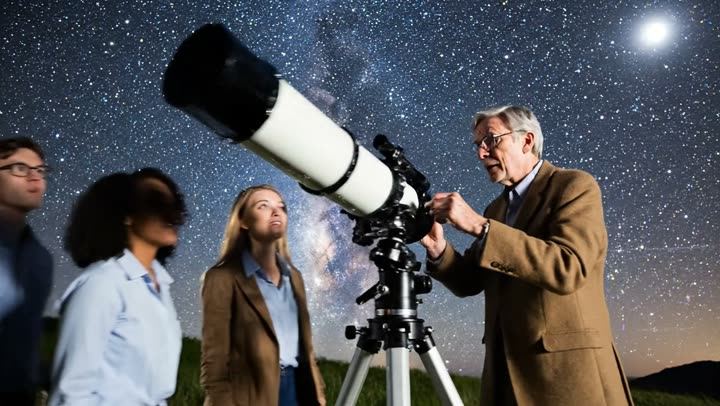
Above: a Google Veo 3.1 clip of a group of people with a telescope under a starry sky, and a Vidu clip of a giant robot in a futuristic city. Both are from our test set, and our video model scored both 99% AI. The robot is obviously science fiction; the stargazers could pass for a real night out. The quiet, believable clips are the ones that need checking.
Real things that look like UFOs
Before deciding a light is either alien or AI, rule out the real explanations. A few common ones:
- Satellite trains. Shortly after a launch, a batch of satellites can travel across the sky in a neat line of evenly spaced lights. Starlink "trains" have set off waves of UFO reports in several countries.
- Rocket plumes at twilight. When a rocket launches shortly before sunrise or after sunset, its exhaust high up can catch the sunlight while the ground is dark, making a glowing, jellyfish-like cloud. NASA's Astronomy Picture of the Day explains one such plume and notes these effects are sometimes mistaken for UFOs.
- Sky lanterns released at weddings and festivals, drifting slowly in groups and flickering orange.
- Drones and drone light shows, which can hover, form shapes and vanish at once when their lights switch off.
- Planes with landing lights coming head-on, which can look like a bright light hanging still for minutes.
- Bright planets such as Venus, which can look unnaturally bright low in the evening or morning sky.
If the video shows a light that matches one of these, you don't need a detector. You need the date, the time and the direction.
Signs a space or sky video is AI-made
- Stars that misbehave. Real stars stay fixed relative to each other. Watch for stars that crawl, flicker in sync, change pattern as the camera moves, or sit in front of clouds.
- A Milky Way that's too bright. A brilliant galaxy over a lit-up city is very unlikely; real skies over towns are washed out by streetlights.
- Light with no source. Faces clearly lit in a dark field, with no torch, screen or moon to explain it.
- Impossible camera work. A phone video at night is usually shaky, noisy and struggles to focus. A smooth, sharp, cinematic shot of a "sighting" is a reason to doubt.
- Scale and shadows. A giant ship over a city should cast shadows, block light and fill the sky with detail. AI ships can look pasted on, like stickers.
- Crowds that don't react. In a real event, people point, shout, run and film. AI crowds can stand still or move in loops.
- Text and logos. Agency logos, flags and writing on rockets or spacesuits that are blurred or spell nothing.
How to check a sky video
- Find the time and place. When and where was it filmed? A video with no date or location is hard to trust.
- Look for a launch or a pass. Check whether a rocket launched around that time, or whether satellites were passing overhead. Satellite-tracking websites predict when satellite trains will be visible from a given place.
- Look for other witnesses. A real, striking event in the sky is filmed by many people across a wide area, and local news usually follows quickly. One perfect clip and nothing else is suspicious.
- Check official sources for space claims. Clips of a launch, a "new mission" or an astronaut are easy to compare with the agency's own channels, such as ISRO's or NASA's.
- Find the first upload. Search a few screenshots with Google Lens. Some "new" UFO clips turn out to be years old, or the work of a visual-effects artist who said so in the original post. Our reverse video search guide explains how.
- Scan it. Our checks look for signs of AI that the eye can't see.
Old fakes and new ones
Fake UFO videos are nothing new. For years they were made with visual effects software, and many still are. A detector for AI-generated video looks for signs that a clip was made or changed by AI generators; a hand-made visual effect on real footage is a different kind of edit, so the source and other witnesses matter just as much. Our guide on whether a video is edited or out of context covers those cases.
Scan the sighting
Paste a link from X, YouTube or Instagram, or upload the file, on our AI-generated video detector. A Quick Scan is free, needs no sign-up and answers in under a minute for most videos. It runs our own video model, which follows how the picture moves over time, along with a frame check, visible AI watermark reading (for marks like "Veo" or "Sora") and Content Credentials, and gives an answer with its reasons: "most likely AI-generated", "most likely real", or "not conclusive". Night footage can be hard for any checker, so weigh the result with the other checks above.
Quick answers
Are UFO videos real?
Many show real objects misidentified, such as satellites, rockets, drones or lanterns. Some are edited or AI-made. Either way, a sighting needs a date, a place and other witnesses before it tells you much.
Why do AI space videos look so convincing?
Darkness hides errors, and most of us have never seen space up close, so we don't know what looks wrong.
What's the first thing to check?
The date, time and place. Then look for a launch, a satellite pass or other people's videos of the same moment.