How it works
Real or AI: why videos are easier to check than photos
A video carries motion, sound and hundreds of frames of evidence; a photo has one frame. What that means for AI checks, and what to do when all you have is a picture.
Video Verifier team · · 4 min read
It sounds backwards, but a video is usually easier to check for AI than a single photo. A photo is one frame, so a generator only has to get things right once. A video is hundreds of frames that all have to agree with each other, plus motion and often sound. Every extra second is another chance for a fake to slip, and another piece of evidence for anyone checking it.
What a video gives away that a photo doesn't
Consistency over time. In a real video, a building keeps the same number of windows from start to finish and a person's earrings stay the same. Generators make each moment look right, but keeping every detail identical across seconds of footage is much harder.
Motion. Real cameras record a world with weight, momentum and physics: water splashes and falls, cloth swings and settles, a hand-held camera wobbles. Our own video model studies exactly this. It follows how the picture changes from frame to frame, running about 12 billion calculations on every frame it reads, and has learned which paths through time belong to real cameras. A photo has no motion to study.
Sound. A voice has to match the lips, the room and the mood of the scene. Background noise has to behave like a real place. A photo is silent.
More places for labels. Video files can carry Content Credentials and metadata, and many AI video tools add a visible watermark that stays on screen for the whole clip.
Where videos are harder
To be fair, videos bring problems of their own:
- They're compressed far more heavily than photos, especially when forwarded, which wipes out fine detail.
- Very short clips of two or three seconds give any check less to work with.
- Real and AI get mixed: real footage with an AI voice, or one generated shot inside a real edit.
What it looks like in practice
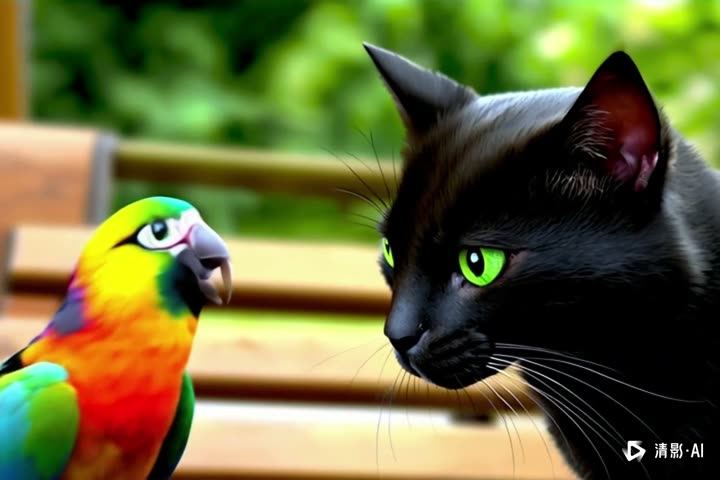
In the first card below: a parrot and a black cat side by side, generated with Zhipu Qingying. Look for the small AI watermark in the corner. If you only had a single still, that mark might be all you had to go on, and a simple crop would remove it. Across the whole clip, our video model, which doesn't read watermarks at all, scored it 99% AI from how the picture changes over time. In the second: a real video of a duck swimming on a lake, shared on Wikimedia Commons, which it read as 96% real.
Video is likely
AI-made

Video is likely
Real
What to do when all you have is a photo
Video Verifier checks videos, not photos. If all you've got is a picture, these steps help:
- Ask for a video instead. If someone sends a photo as proof of an accident, a product or themselves, ask for a short video: turning the object around, panning across the room, saying today's date. That's much harder to fake on demand.
- Find the source. Search the picture with Google Lens or another reverse image search and look for the earliest copy. If it turns out to be a frame from a video, find that video and check it.
- Look for Content Credentials. Some AI tools and cameras sign their images. You can upload a photo to the free Content Credentials verify tool to see any that survive. A credential that says AI was used is strong evidence; no credential proves nothing, because they're easily stripped. Our Content Credentials explainer covers why.
- Zoom in on the hard parts. Hands, text, jewellery, reflections, shadows and faces in the background are where image generators slip most.
- Check the corners. Some tools add a small logo or "AI" tag. A corner that looks cropped or smudged is worth noticing.
- Weigh the source over the pixels. An anonymous account posting one dramatic picture with no other angles deserves suspicion, however real the picture looks.
Photos turned into videos
A common trick goes the other way: a real photo, often of a loved one or a public figure, is animated by AI to smile, talk or move. A video check can tell you the motion was AI-made, but not whether the photo it started from was real. Look for the original still image, and check where it came from.
Screenshots of videos
If someone sends you a screenshot of a video, it has lost almost everything that makes a video checkable: the motion, the sound and the file's labels. Ask for the video, or find it yourself, and check that instead.
Test your eye, then check
Our Real or AI quiz uses short clips like the ones above: see how many you can call by eye. Then paste a video link into the AI or real checker and compare your guess with the evidence. Our list of 12 signs of an AI video will sharpen your eye for next time.
Quick answers
Can Video Verifier check a photo?
No, it checks videos. For a photo, use reverse image search, Content Credentials and the source checks above, or ask for a video.
Why do AI photos look more convincing than AI videos?
A photo only has to look right once. A video has to stay right in every frame, move like the real world and often sound right too.
Is a still frame from a video enough to check?
Rarely. A single frame loses the motion and sound that carry most of the evidence. Check the full video whenever you can.