Guides
AI “old footage” and history videos: how to tell
Fake “rare footage” of the past is easy to generate now. How to tell AI history clips from real archive film, and from real film that has been colourised or upscaled.
Video Verifier team · · 4 min read
"Rare footage of an Indian city in the 1890s." "Never-before-seen video of a famous leader." Clips like these are easy to make with AI video tools now, and they spread because hardly anyone can say from memory what the past really looked like. To check one, ask three questions: is it fully AI-made, is it real archive film that has been enhanced, or is it real film with the wrong caption?
Three kinds of "old footage"
- Fully AI-made. Someone asked a generator for "a 1920s street, black-and-white film" and got one. Nothing in it ever existed.
- Real but enhanced. Genuine archive film that has been colourised, sharpened, upscaled, smoothed to a higher frame rate or given added sound. Many of these tools use AI too, so the result is real footage with AI changes.
- Real but mislabelled. Genuine old film with the wrong place, year or event in the caption. This is common, and needs no AI at all.
Each needs a different answer. Calling a restored newsreel an "AI fake" is as wrong as calling a generated clip "rare footage".
How early film tends to look
A little film history helps. These are general patterns, not rules, and every one has exceptions:
- Cameras rarely moved freely. Early film cameras were heavy and usually sat on a tripod. Moving shots were mostly filmed from a vehicle, a train or a boat. A smooth, floating, drone-like glide through an old street is a red flag.
- People notice the camera. A film camera on the street was a novelty, so passers-by often stopped, stared, waved or followed it. Generated clips may miss this, with crowds going about their business as if no camera were there.
- Motion can look fast and jerky. Hand-cranked cameras ran at uneven speeds, so old film played back today often looks sped up.
- Damage belongs to the film. Real scratches, dust and flicker change from frame to frame. A neat, even layer of grain and scratches sitting over a clean, steady picture suggests a filter.
Tells of an AI-made "archive" clip
- Writing on signs, posters and shopfronts that almost reads, but doesn't.
- Clothes, vehicles or buildings from the wrong decade or the wrong country.
- Faces that are crisp and modern-looking while everything around them is soft.
- Film-trailer framing: shallow focus, perfect composition, dramatic light.
- A few beautifully composed seconds with no real beginning or end.
In the first card below: a real old black-and-white film of a busy street, shared on Wikimedia Commons, which our video model read as 99% real. In the second: a man walking into a bright dust storm, generated with Genmo Mochi 1, which it scored 99% AI. The Mochi clip isn't styled as old film, but it makes a useful point. Dust, haze and grain hide detail from your eye, while our model looks at how the whole picture changes over time, and here it wasn't fooled.
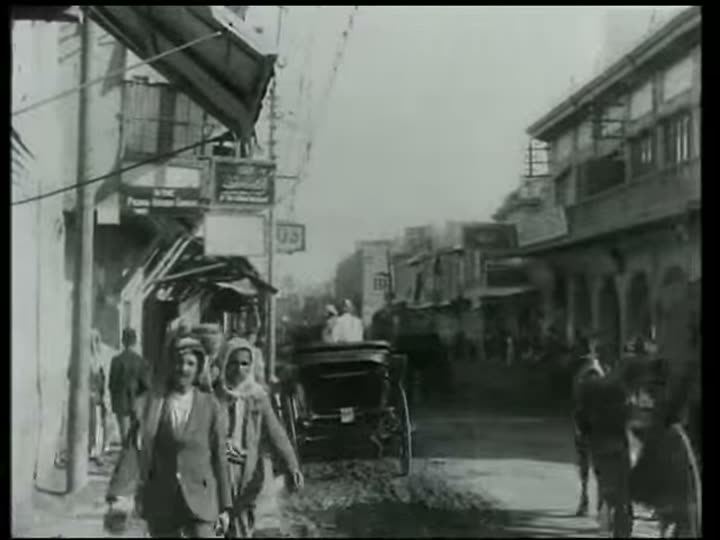
Video is likely
Real
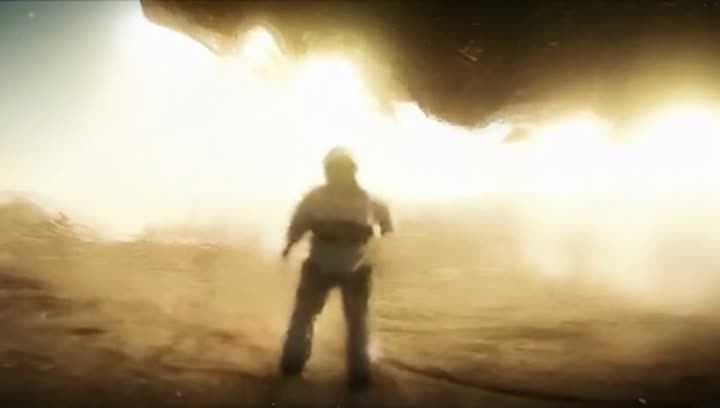
Video is likely
AI-made
How to check an old clip
- Look for the archive. Genuine historical footage almost always traces back to an archive: a film library, a broadcaster or a museum. British Pathé has a large newsreel archive you can search and watch online. The National Film Archive of India, now part of NFDC, preserves Indian film, and Wikimedia Commons and the Internet Archive host many public-domain films. Search the subject plus a year and words like "newsreel" or "archive footage".
- Look for a source credit. Honest restorations name the archive they started from. "Rare footage" with no source, from a page that posts a lot of "rare footage", is a warning sign.
- Compare versions. If a colourised clip is genuine, a black-and-white original should exist with the same people making the same movements.
- Check the caption's facts. Do the vehicles, flags, uniforms and buildings fit the year and place claimed? Our guide on finding when a video was filmed has more methods.
- Scan it. Paste the link on the home page, then read the result with the clip's history in mind.
Reading a scan on archive film
Old film is unusual material for any detector: low resolution, damage, odd frame rates and, often, heavy restoration. Keep these in mind:
- Restoration can be AI processing. Upscaling, frame interpolation and colourisation can leave AI traces in real footage. If a restored clip leans AI, consider whether the restoration is what's being picked up. A Deep Scan, which breaks the result down into real, real + AI and fully AI, helps here; see Quick Scan vs Deep Scan.
- "Not conclusive" is a fair answer for tiny, heavily damaged clips.
- Sources settle the date. A clip found in a named archive's catalogue is strong evidence on its own. A detector can say whether footage looks camera-made; it can't place it in time.
If the footage is real but the story attached to it isn't, our guide to edited and out-of-context videos shows how to separate the two.
Why it matters
Fake history isn't just harmless nostalgia. Invented "footage" can be used to back up false claims about communities, faiths, borders and leaders, and once it spreads it muddies the record for everyone who comes later. If a clip claims to show "what really happened", it deserves the same care as today's news.
Quick answers
Is a colourised old video fake?
Not necessarily. It may be genuine footage with colour added. Look for the black-and-white original and the archive it came from.
Can AI make convincing old film?
Yes, at a glance. But early film has habits, such as static cameras, people staring at the lens and uneven speed, that generated clips can get wrong, and the lack of any archive source is the biggest giveaway.