Guides
AI kids videos on YouTube: how to spot them and what parents can do
AI-made cartoons and 'learning' videos are flooding toddlers' YouTube feeds, often without labels. How to recognise them and what parents can do on YouTube and YouTube Kids.
Video Verifier team · · 4 min read
Have a video to check right now? Run a free check on crackly-ai.com →
A growing share of the cartoons, nursery rhymes and "learn your ABCs" videos recommended to young children on YouTube are mass-produced with AI. Many are harmless but mindless; some have warped faces, wrong letters and colours, or disturbing scenes. They usually carry no AI label, because YouTube's disclosure rule covers realistic content, not cartoons. You can spot them by the channel (hundreds of near-identical uploads, no human team), by mistakes in what they claim to teach, and by visual glitches. The best protection is choosing what your child watches rather than letting autoplay choose.
What's happening
In late 2025 a New York Times investigation reviewed more than 1,000 videos recommended to young children on YouTube and found channels posting AI-made clips that claimed to teach letters, numbers and animals while getting them wrong, with warped faces, extra limbs and garbled text, including on the YouTube Kids app. Reporting since then has described the trend as a flood of "AI slop" aimed at toddlers (Digital Trends, The 74).
In April 2026 a coalition of more than 200 organisations and experts wrote to YouTube asking it to stop recommending AI slop to children, and to ban AI-generated videos from YouTube Kids (Fortune). YouTube says it limits AI content on YouTube Kids to high-quality channels and penalises spam, and it removed some channels after the reporting. Its CEO named reducing low-quality AI content as a priority for 2026.
Why the labels don't help
YouTube asks creators to disclose AI when content looks realistic. A cartoon about a talking banana doesn't, so it needs no label, even if a machine made every frame. And toddlers can't read labels anyway. That's why parents have to judge by the channel and the content.
How to spot AI kids videos
- The channel uploads constantly. Dozens or hundreds of videos in the same style, several a day, often with similar titles stuffed with keywords ("Learn Colors ABC Animals Nursery Rhymes Kids Songs").
- No real people behind it. No creator names, no about page, no other social accounts, no voices that change between videos.
- It teaches things wrong. Letters that don't match the word, animals with the wrong name or sound, counting that skips numbers, colours that don't match what's said.
- Faces and bodies glitch. Characters whose faces warp between shots, extra fingers or legs, objects that melt or morph.
- Text turns to gibberish. Signs, books and letters on screen that look like writing but aren't.
- It's built for endless watching. Very long compilations, loud constant music, no story, and no natural pauses or endings.
Some AI-assisted channels are careful and fine; some human-made channels are poor. These signs help you decide, not convict.
Video is likely
AI-made
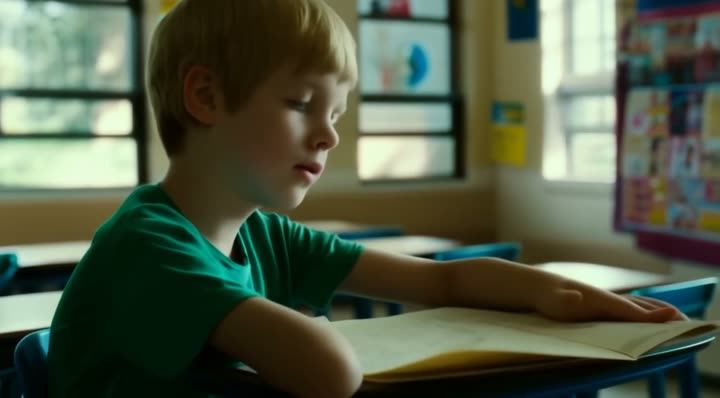
Above: a boy reading at a desk, from a clip made with Luma Dream Machine. Generators can now make classroom and home scenes that look like real children's content. Our video model scored it 99% AI.
What parents can do
- Choose before you press play. Build playlists of shows and channels you've checked, and use those instead of the home feed or autoplay.
- Use YouTube Kids with "Approved content only". In YouTube Kids, a parent profile setting lets you limit your child to videos, channels and collections you've hand-picked, so recommendations can't add new channels.
- Turn off autoplay in the YouTube or YouTube Kids settings, so one video doesn't roll into the next.
- Block channels you don't want. In YouTube Kids, use the three dots on a video and choose Block this channel.
- Watch together when you can. Young children copy what they see; you'll spot a bad channel within minutes.
- Follow pediatric advice. The American Academy of Pediatrics' guidance for parents choosing media for young children recommends avoiding content that is AI-generated or highly sensationalised.
Talking to older children
From around school age, children can learn to ask "who made this, and how do they know?" Our guide to talking to kids about AI videos has age-by-age ideas, and the Real or AI quiz is a quick way to show them how convincing AI video has become.
Quick answers
Are AI kids videos bad for children?
Experts' main worries are content that's wrong or confusing, and videos designed to keep very young children watching. Not every AI-assisted video is harmful, but unchecked channels make it hard to know.
Does YouTube label AI cartoons?
Usually not. YouTube's disclosure rule covers realistic AI content, so animated AI videos generally don't need a label.
Is YouTube Kids free of AI videos?
No. YouTube says it limits AI content there, but reporters found AI videos on YouTube Kids. "Approved content only" mode gives you the most control.
How can I check a video I'm unsure about?
For realistic videos, paste the link into an AI video detector. For cartoons, look at the channel and the content using the signs above; detectors are built and tested for realistic footage, not animation.
Check a realistic clip
Seen a realistic video your child found and want to check it? Paste the link on crackly-ai.com. A Quick Scan is free to try and shows the reasons behind its answer.