Guides
Fake storm and hurricane videos: how to spot AI weather footage
During every big storm, AI clips of sharks in floodwater, wrecked airports and impossible waves go viral. How to check weather footage before you share it, and where to get real updates.
Video Verifier team · · 3 min read
Have a video to check right now? Run a free check on crackly-ai.com →
When a big storm hits, fake videos arrive with it: AI clips of sharks in flooded streets, planes tossed across runways, impossible waves and tornadoes, along with real footage from old storms reshared as new. To check a storm video, look for the source and a place you can verify, search whether the same clip appeared in a past storm, watch water, debris and wind for physics that doesn't work, and follow official weather and emergency accounts for what's really happening.
What happened during Hurricane Melissa
When Hurricane Melissa struck Jamaica in October 2025, AI-generated videos flooded social media. AP reported a clip of sharks swimming in a hotel pool that passed 2 million views within a day, with watermarks pointing to a creator who makes AI visual effects, plus fake videos of a ravaged Kingston airport and planes on flooded runways (Boston Globe/AP). European broadcasters' fact-checkers described a "deluge" of AI-generated and old content that masked the storm's real impact (EBU Spotlight).
The "shark in the floodwater" idea isn't even new: fact-checkers have traced a doctored street-shark image back to Hurricane Irene in 2011.
Why storm fakes spread so fast
- People are scared and hungry for updates, and share what they see to warn others.
- Bad weather hides AI errors. Rain, darkness, shaky "phone" footage and spray make glitches hard to see.
- Views pay. Accounts post dramatic clips to grow followers during the news peak.
Six checks for storm footage
- Find a place you can verify. Street signs, landmarks, shop names. Does the location exist, and does it look like this on maps?
- Search for older copies. Screenshot a clear frame and search it with Google Lens. Real footage from a past storm reshared as new is as common as AI fakes. See is this viral video old?.
- Watch the water and wind. AI water often flows in one direction only, waves repeat, debris appears from nowhere, and trees bend the wrong way for the wind.
- Look for animals and people. Sharks in pools, impossible rescues and crowds standing calmly in a hurricane are classic fakes.
- Check the account. A page posting dozens of dramatic weather clips from different places is a slop account, not a storm chaser.
- Look for watermarks. Some fakes carry a creator's watermark or an AI tool's logo in a corner; crops and re-posts remove them.
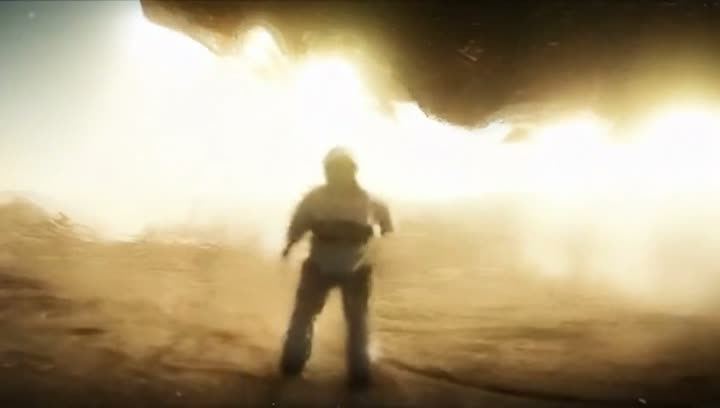
Video is likely
AI-made
Above: a man walking into a bright dust storm, from a clip made with Genmo Mochi 1. Weather and disaster scenes like this one are easy to generate and very hard to judge at a glance. Our video model scored it 99% AI.
Where to get real updates
Follow your national weather service and emergency management accounts, such as the US National Hurricane Center, the India Meteorological Department or your local authority, and established local news outlets with reporters on the ground. In a disaster, a calm official update is worth more than the most dramatic clip.
Quick answers
Were the Hurricane Melissa shark videos real?
No. AP and fact-checkers reported they were AI-generated; one carried watermarks linking it to a creator of AI visual effects.
How can I tell if a tornado or flood video is AI?
Check the place, search for older copies, watch the physics of water and debris, and look at the account. Then scan the clip.
Is it harmful to share fake storm videos?
It can be: fakes drown out real warnings, waste emergency responders' time and spread panic or false reassurance.
Check a storm clip before you share it
Paste the link or upload the video on crackly-ai.com. A Quick Scan is free to try. For disaster and war footage more broadly, see fake disaster and war footage.