Scams and safety
AI bodycam videos: how to spot fake police footage
Fake police bodycam, arrest and courtroom videos are pulling in billions of views. How the AI 'bodycam' genre works and how to check a clip before you believe it.
Video Verifier team · · 4 min read
Have a video to check right now? Run a free check on crackly-ai.com →
AI bodycam videos are made-up police clips styled as body-worn camera footage: a shaky first-person view, a timestamp in the corner, an arrest or a confrontation that never happened. Whole channels now post them, often with no AI label on the video itself. To check one, look for an official source and a case you can find in the news, then for the visual tells of AI, then scan it.
A fast-growing genre
Police drama is one of the most-watched genres on YouTube, and AI has made it cheap to fake. The fact-checking newsletter Indicator found 24 channels that had drawn more than 1.7 billion views posting mostly AI-made courtroom, legal and bodycam videos. Many used no AI label, used it inconsistently, or mislabelled AI content as "Auto-dubbed".
It isn't harmless entertainment everywhere. In South Korea, police arrested a YouTuber in early 2026 who ran a channel of AI-made "police dispatch" bodycam clips with more than 30 million views; police said he removed the watermarks that marked the footage as AI. In the UK, fact-checkers debunked a viral compilation of police tackling "scooter thieves" that was entirely fake, and the Philippine National Police warned the public about AI videos falsely portraying officers.
Why it matters
- It stirs real anger. Fake clips of police brutality, or of suspects attacking officers, are made to provoke outrage, and they get shared as evidence in real arguments.
- It undermines real footage. When fake bodycam clips are everywhere, genuine videos of real incidents are easier to dismiss as "probably AI". Experts quoted by Euronews warned about exactly this.
- Labels go missing. A channel may describe itself as "fictional" on its About page, but the individual video, once shared or re-uploaded, carries no such warning.
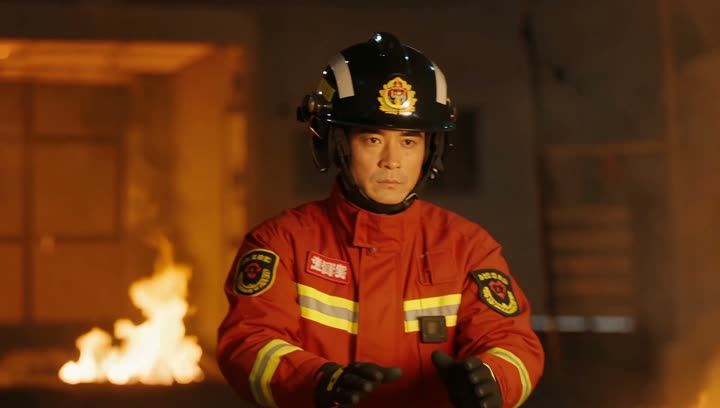
Video is likely
AI-made
Above: a firefighter in front of flames, from a clip made with ByteDance's Seedance 1 Pro. Emergency-service scenes like this one are easy to generate and hard to question. Our video model scored it 99% AI.
Six checks for a bodycam or police video
- Find the official release. Genuine bodycam footage is usually released by a police department, a court or a news outlet, with a date, a place and a case. Search for those details. If nobody can say which department or incident it is, be very sceptical.
- Read the text on screen. Badges, name tags, car numbers, street signs and the camera overlay. AI often produces lettering that's nearly right but garbled, or that changes between frames.
- Listen to the dialogue. Real incidents are messy: people talk over each other, mumble and repeat themselves. Fake clips tend to have neat, dramatic lines, a clear villain, and a "twist" ending that feels scripted.
- Watch hands and contact. Handcuffs, door handles, grabbing an arm. AI struggles with hands touching objects; look for fingers merging with metal or objects passing through each other.
- Check the channel. Does it post a new "unbelievable arrest" every day? Is there a disclaimer in the channel description but not on the videos? Are some clips real footage with an AI voice laid over them? All are common patterns.
- Look for a fact-check. Search the claim with "fact check". Lead Stories, Full Fact, AAP, BOOM and others regularly debunk viral police clips.
Then scan it. Our scanner looks at how the picture moves over time, along with the frames, the voice and any AI watermark or Content Credentials. It won't say "definitely real" or "definitely fake", but it shows its reasons.
Real footage, wrong story
Not every misleading police clip is AI. Real bodycam footage is also cut down, slowed, or shared with a false caption about where and when it happened. If a scan says the footage looks real, still check the story: our guide to edited and out-of-context videos shows how.
Quick answers
Are AI bodycam videos allowed on YouTube?
YouTube requires creators to disclose realistic AI content, and its July 2025 rules stop mass-produced, repetitive videos from earning money. Enforcement is patchy, which is why so many unlabelled clips remain.
How can I tell if bodycam footage is real?
Trace it to an official release or a news report about a real incident, check the on-screen text and the dialogue, look at the channel's other videos, and scan it. Several warning signs together matter more than any single one.
Why do people make fake police videos?
Views and money, mostly. Police drama keeps people watching, and AI makes a new "incident" in minutes. Some fakes are made to push a political message.
Check a police clip
Paste the link or upload it on crackly-ai.com. A Quick Scan is free to try, needs no sign-up and shows the reasons behind its answer. For a clip about a public figure or a political event, our guide to verifying political videos adds more checks.